

Welcome to our Course Selection Information page. This page provides students and families with the key information needed to make informed course choices.
2026 Course Selection Dates:
- Thursday, February 12 - First day students can submit courses.
- Friday, February 20 - Deadline to submit courses.
Important Considerations
You will be choosing courses once for the following year. This means once you submit, there are no changes. Take your time, do your research, and ask questions - Be satisfied with your choices now.
Courses
- Students, please check your GAPPS accounts for the link to the Course Selection folder.
Graduation Requirements
Ensure you review graduation requirements, including:
- compulsory and elective credit requirements
- community involvement
- Ontario Secondary School Literacy Requirement
- online learning credits
Post-Secondary Pathways
- What is your post-secondary pathway destination?
- Workplace - OSSD
- Apprenticeship - OSSD + requirements (varied)
- College - ENG4C/ENG4U + combo of Grade 11&12 C/M/U courses
- University - ENG4U + 5 M or U courses (check prerequisites
Goals and Opportunities
- Reflect on your past performance.
- Assess your achievement and abilities.
- Consult with your teachers and parents.
- Explore pathway programs, like co-op, dual credit, SHSM.
Course Planning by Grade
*To print this page with information for a specific grade, click on the drop down title to open this information before printing.
Graduation Requirements
- 17 Compulsory Credits + 13 Elective Credits = 30 Credits
- 40 Hours of Community Involvement
- Grade 10 Literacy Test & Financial Literacy Math Assessment
- 2 Online Learning Credits ***You can opt out.
- Starting in September 2027, students must earn a new Financial Literacy Graduation Requirement as part of their
compulsory Grade 10 Math course. Students will need to achieve a mark of 70% or higher to pass this new
requirement and earn their high school diploma.
| Grade 9 | Grade 10 | Grade 11 | Grade 12 |
|---|---|---|---|
| English | English | English | English |
| Math | Math | Math | Elective |
| Science | Science | Elective | Elective |
| Canadian Geography | Canadian History | Elective | Elective |
| French | Careers/Civics | Elective | Elective |
| Elective (Physical Education recommended) | Elective / Tech (1 tech credit in Grade 9 or 10) | Elective | Elective |
| Elective (Art credit recommended) | Elective | Elective | |
| Elective / Tech (1 tech credit required in Grade 9 or 10) | Elective | Elective | |
| Total: 5 compulsory + 3 elective = 8 credits | Total: 5 compulsory + 3 elective = 8 credits | Total: 2 compulsory + 6 elective = 8 credits | Total: 1 compulsory + 5 elective = 6 credits |
How to Read Your Ontario Student Status Sheet
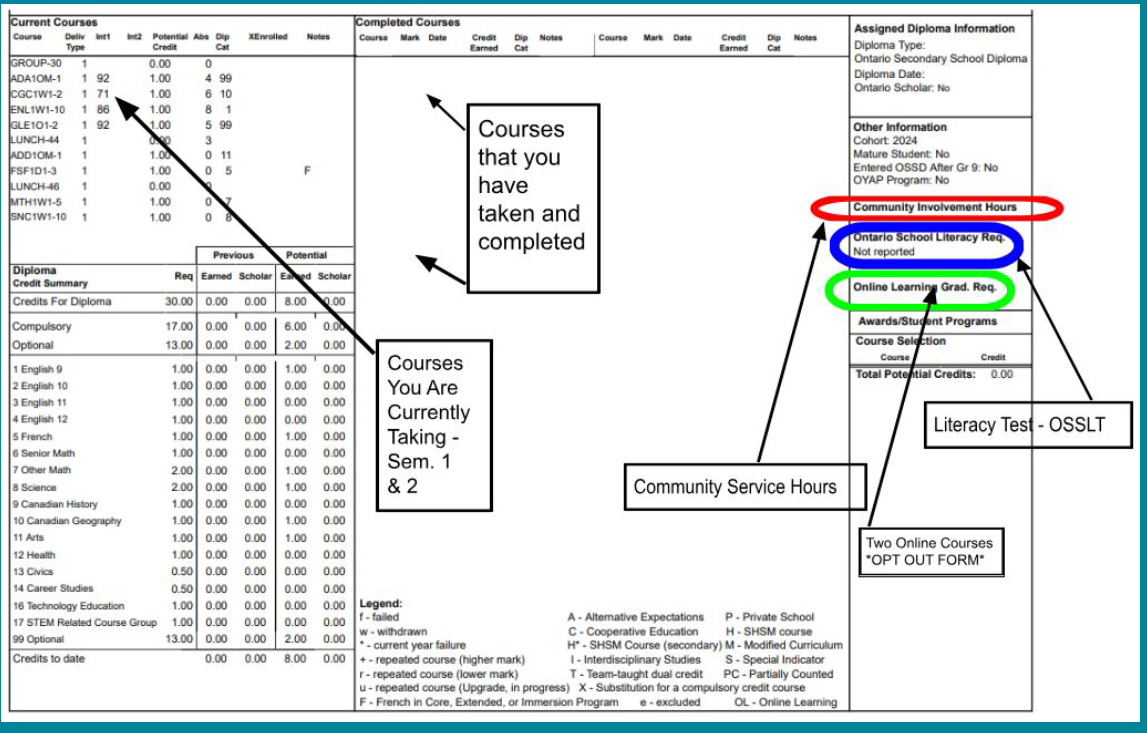
Important Considerations
Five (or Six) Compulsory Courses:
- English, Math, Science, History, Civics/Careers (CIVCAR)
- History - offered at the Academic level only for Grade 10
- English, Math, & Science - offered at the Applied & Academic level
- CIVCAR - offered as an Open course
- **Technology Course - if you did not complete a tech credit in Grade 9
Three Elective Courses:
- Can be completely different from Grade 9 electives
- Have you done an Arts (visual art, dance, drama, music) and Phys. Ed. credit?
Graduation Requirements
- 17 Compulsory Credits + 13 Elective Credits = 30 Credits
- 40 Hours of Community Involvement
- Grade 10 Literacy Test & Financial Literacy Math Assessment
- 2 Online Learning Credits ***You can opt out.
- Starting in September 2027, students must earn a new Financial Literacy Graduation Requirement as part of their
compulsory Grade 10 Math course. Students will need to achieve a mark of 70% or higher to pass this new
requirement and earn their high school diploma.
| Grade 9 | Grade 10 | Grade 11 | Grade 12 |
|---|---|---|---|
| English | English | English | English |
| Math | Math | Math | Elective |
| Science | Science | Elective | Elective |
| Canadian Geography | Canadian History | Elective | Elective |
| French | Careers/Civics | Elective | Elective |
| Elective (Physical Education recommended) | Elective / Tech (1 tech credit in Grade 9 or 10) | Elective | Elective |
| Elective (Art credit recommended) | Elective | Elective | |
| Elective / Tech (1 tech credit required in Grade 9 or 10) | Elective | Elective | |
| Total: 5 compulsory + 3 elective = 8 credits | Total: 5 compulsory + 3 elective = 8 credits | Total: 2 compulsory + 6 elective = 8 credits | Total: 1 compulsory + 5 elective = 6 credits |
How to Read Your Ontario Student Status Sheet
Important Considerations
Compulsory Courses:
- English, Math:
- E = Workplace (MEL3E)
- C = College (NBE3C1, MBF3C1)
- M = College/University (MCF3M1)
- U = University (NBE3U1, MCR3U1), Science, History, Civics/Careers (CIVCAR)
Elective Prerequisites - Thinking Ahead - Plan Backward:
- Check Grade 12 courses to see if there is a Grade 11 prerequisite
- For example TDJ4M1 requires TDJ3M1 (design technology)
- Science, Computer Science, Technology, Arts, Languages, Accounting, etc.
- Reminder: have you done an Arts (visual art, dance, drama, music) and Phys. Ed. credit?
Starting to Think About Post-Secondary
Are there prerequisite courses you need?
- Apprenticeship
- College
- University
- Workplace
Graduation Requirements
• Grade 12 → 18 Compulsory Credits + 12 Elective Credits = 30 Credits
• 40 Hours of Community Involvement
• Grade 10 Literacy Test
• 2 Online Learning Credits. ***You can opt out.
| Grade 9 | Grade 10 | Grade 11 | Grade 12 |
|---|---|---|---|
| English | English | English | English |
| Math | Math | Math | Elective |
| Science | Science | Elective | Elective |
| Canadian Geography | Canadian History | Elective | Elective |
| French | Careers/Civics | Elective | Elective |
| Elective (Physical Education recommended) | Elective) | Elective | Elective |
| Elective (Art credit recommended) | Elective | Elective | |
| Elective / Tech (1 tech credit required in Grade 9 or 10) | Elective | Elective | |
| Total: 5 compulsory + 3 elective = 8 credits | Total: 5 compulsory + 3 elective = 8 credits | Total: 2 compulsory + 6 elective = 8 credits | Total: 1 compulsory + 5 elective = 6 credits |
How to Read Your Ontario Student Status Sheet
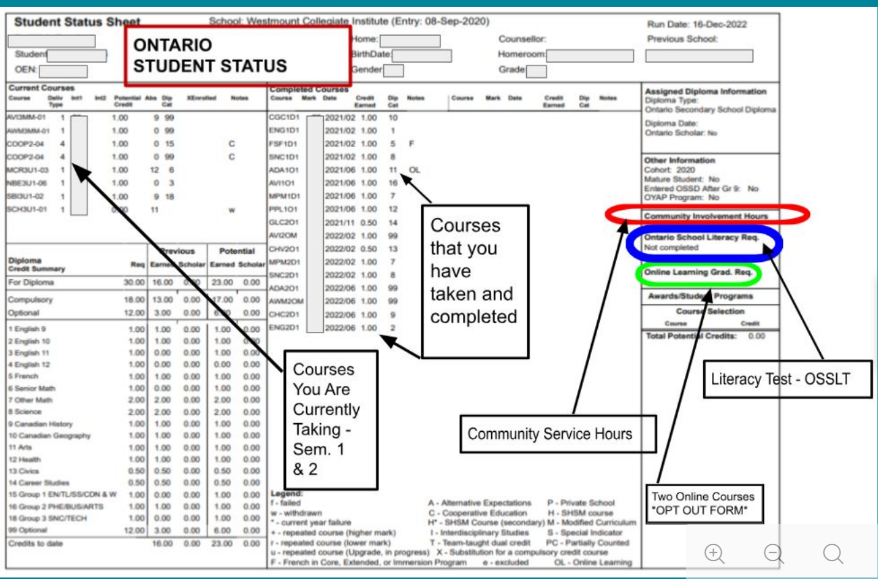
Current Grade 11s and returning grade 12s must choose one from each group:
| Group 1 | Group 2 | Group 3 |
|---|---|---|
|
|
|
Important Considerations
Will you meet all graduation requirements?
At this stage, it is not about leaving doors open, make sure you are taking courses required for post secondary programs - do your research. What courses do you do well in?
What is your post-secondary pathway destination?
- Apprenticeship (OSSD + requirements (which vary). Consider OYAP)
- College (ENG4C or ENG4U + combo of Gr. 11 & 12 C, M or U courses)
- University (ENG4U + 5 M or U courses = 6 courses (check prerequisites)
- Workplace (OSSD)
Graduating?
Please go to myBlueprint and select "Not returning next year."
Returning?
Please go to myBlueprint and choose courses. You need to add an additional year.
Important Information for All Grades
- Do not select a compulsory course if you’re taking it in summer school or elsewhere. In myBlueprint, change the compulsory course to a different elective. **See Guidance.
- Number of Required Courses Per Year:
- Grade 9 - 8 courses
- Grade 10 - 8 courses
- Grade 11 - 8 courses
- Grade 12 - We recommend selecting 7 courses
- 2 alternates are always required for every student. Students are selecting courses that they would like to take at WCI - Selection does not guarantee placement in a course on your timetable. Alternate courses are important.
- Course requests submitted in February determine next year’s timetable.
- Once courses are submitted, changes are not guaranteed.
All students must earn at least two online learning credits as part of the requirements for an Ontario Secondary School Diploma, unless they have opted out.
To opt out:
- Students pick up a form from the Guidance Office OR there will be an option in myBlueprint during Course Selections.
- Return form to Guidance
- Go to the YRDSB website or the school website homepage. Scroll down and click on “Online Student Tools”. On the page that opens, scroll down and click on “My Pathway Planner”.
- Login using your YRDSB username and password.
- Using the navigation menu on the left side of your screen, select “High School” to see your “Official High School Plan”.
- Review the courses in the previous and current year columns. In the next grade column of your planner, click + [Course].
- Review the courses in the subject discipline, and then click “Add Course” when you find the course you want.
- The Graduation Indicator will help you keep track of your progress towards graduation. Click “View Progress” for a list of specific graduation requirements.
- When you are ready to submit your course selections, click the blue “Review Course Selections” button. Please know that you will not be able to modify your course selections once submitted.
- If you plan on taking a summer school course, you may be asked to add a “comment to Guidance”. Some schools may request that you indicate your summer school intention using a Google Form link which will be found on your planner. This does not register you for summer school.
- If you are not attending a YRDSB school next year, click on the “Not returning next year?” button at the top of your High School Progress box. Select the option that best suits your pathway, then press “Confirm”.
- Approval requests to a parent/guardian In myBlueprint, once students submit their courses they are prompted with a Send Approval Email option. Once clicked, a parent or guardian’s email address can be added. Note: if they forget to send the approval email at the time of submission, they can simply open their High School Plan and click the option to Send Approval Email at a later time.
- After entering an email address and clicking Send Approval Email, the parent/guardian receives a course selection approval request email, including:
- In the course selection approval request email, the parent/guardian has the option to Approve or Reject the student’s selections by clicking a button or link in the email.
- If a parent/guardian does not have an email address, they can request a paper copy from the school.
- Once you have carefully checked the Review Courses page, click on “Submit Course Selections”.
- After submitting your course selections, you will receive a Success notification.
- If you wish to choose an online credit, first select the online holding code in the subject discipline, and then click “Add Course”, please choose a course from the drop down menu that appears.
- You will receive a confirmation of your course selections after the March Break
Specialty Programs

Have Questions?
- Talk to teachers about the options for courses - they teach them!
- Course selection workshops are available. Check with the Guidance Office.
- Guidance counsellors will be visiting all Grade 9-11 classes to help with course selection.
- Drop into Guidance.