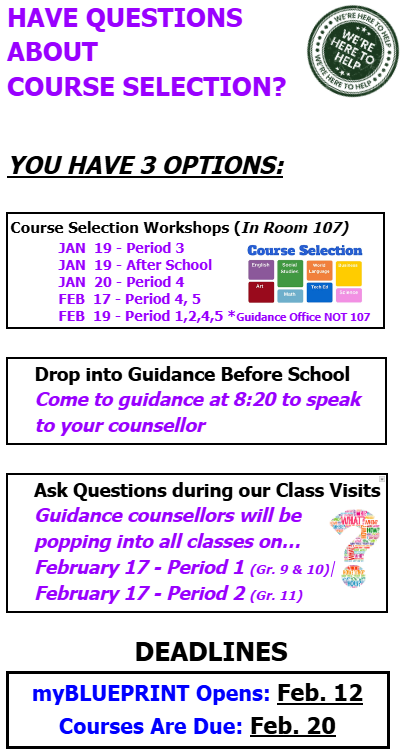

It’s course selection time for the 2026-2027 school year! During the months of January and February we will focus on choosing courses for the following school year. HOW DO STUDENTS CHOOSE THEIR COURSES? Through myBlueprint. Students will need to log in. Instructions are in the google folder (see below). DEADLINES Course Selection Opens: Tuesday, February 12 (9:00am) ACCESS THE GOOGLE DRIVE AND RESOURCES **The most important source of information – students will find everything they need here. https://drive.google.com/drive/folders/160QyKX3gWH4Fw_UGK6--r6JvM8pgvMcd?usp=sharing Reminder: Only students can access this drive. They use their Gapps account. MANDATORY PARENT/GUARDIAN APPROVAL There is a 2-step approval process for course selection. 1. Students must enter a parent/guardian email address into myBlueprint when they submit their courses. Please ensure your student knows your email address. COURSE SELECTION WORKSHOPS If students would like some more in-depth information about courses, please have them drop into one of these sessions. All workshops will take place in Room 107. JAN 19 - Period 3 REMINDER - OPTING OUT OF THE TWO REQUIRED ONLINE LEARNING CREDITS What is the Online Learning Graduation Requirement? All students must earn at least two online learning credits as part of the requirements for an Ontario Secondary School Diploma (OSSD)unless they have opted out or been exempted. How do I opt out?
ADDITIONAL RESOURCES |
DOES YOUR STUDENT NEED HELP WITH COURSE SELECTION? Please refer them to this poster:
|